


Vooks: Read-Aloud Kids' Books
4.3352.00 Reviews
App Specs
- Version
- 19.7.0
- Updated On
- License
- Free
- Downloads
- 500,000+
- Developer
- Vooks Inc
- Categories
- Education
- Platform
- Android
Screenshots
 Analysis by AppCompare
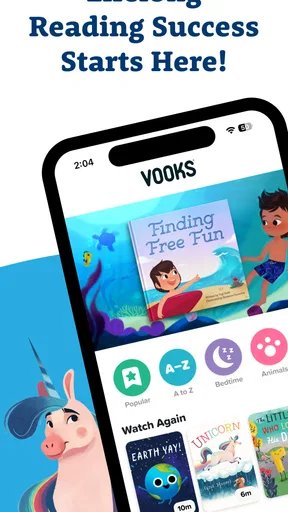
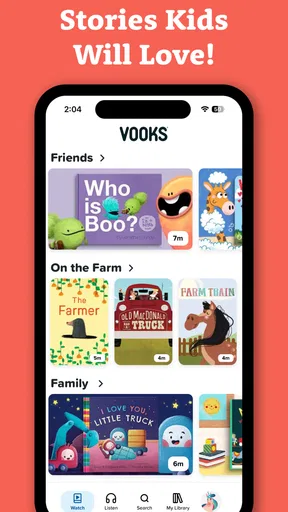
Children’s reading apps often promise to make screen time feel more worthwhile, but the real test is what happens when a child wants one more story, a parent is busy, or a device is not especially new. After spending time with Vooks: Read-Aloud Kids' Books, I found an education app built around animated read-aloud books rather than games, quizzes, or an endless stream of distracting activities. That narrow focus is its biggest strength: it gives families a simple way to turn a short break into shared or independent storytime.
Vooks Inc has made the app free to install, with optional in-app purchases ranging from $9.99 to $69.99 per item. It is rated for Everyone, runs on Android 7.0 and later, and its current version is 19.7.0. The app has reached over 500 thousand installs and holds a 4.3 average from around four thousand ratings, which suggests a solid level of interest without making it the universal answer for every family.
How Vooks feels in everyday use
I find Vooks most useful when I treat it as a small, planned story break rather than something to hand over without a purpose. The animated read-aloud format can make a book easier for a child to follow, while a parent’s quick choice of story and a question afterward helps keep the experience active. That everyday rhythm also makes it easier to think about what choices and safeguards matter before a child uses the app.
A calm alternative to ordinary video apps
The first thing I noticed is that Vooks sits in an unusual space between a digital library and children’s video content. The books are animated and read aloud, so a child can follow the story through pictures, movement, and narration without needing to decode every word independently. That makes it especially approachable for preschoolers, early readers, and children who enjoy being read to but are not always ready to sit with a conventional paper book.
I would not describe it as a replacement for physical books. A printed story encourages a different kind of attention: turning pages, pointing at details, and talking directly with an adult. Vooks is better suited to moments when those things are difficult, such as a quiet activity before bed, a waiting-room distraction, or a short period when a parent needs to prepare dinner. Its value comes from making a story available when the household is already relying on a screen.
The animation adds energy, but the app remains more focused than a general children’s video service. There is a beginning, middle, and end to each book, which gives the session a natural stopping point. That matters in a home where a child can otherwise move from one unrelated clip to another without noticing how much time has passed.
What to expect from speed and loading
Vooks is not the kind of app where speed is measured by rapid taps or competitive reactions. The important performance question is whether the library opens smoothly enough for a child to start a story without a long period of adult assistance. In my experience, the interface is most comfortable when the device and connection are already ready for media playback. The animated format naturally asks more from a phone or tablet than a plain text reader would.
Worth Reading Before You Choose

EA SPORTS FC Mobile 26 Is a Bigger Football Game, but It Takes Time

Flipboard Shows What News Apps Must Do Beyond the Feed

Switching to Android Auto Means Rethinking Your Driving Routine

Google Calendar Makes a Crowded Week Easier to Manage

Ludo King Makes the Most of the Minutes Between Plans

Baby Panda World Brings Quick Play to Modern Phones, but Its Game Library Feels Busy
That difference is worth keeping in mind before choosing it for an older handset. A basic reading app can feel instant because it mainly displays text and static images. Vooks has to present moving illustrations and spoken narration, so the experience is more demanding. On a reasonably current device, that trade-off makes sense because the motion is part of the appeal. On a tired device with limited free space or a crowded background, a parent may notice slower transitions or less comfortable playback.
My practical advice is to open the app before handing the device to a child, especially if the session matters. Pick the story, check that playback begins normally, and keep the device charged. This small routine removes the most frustrating part of children’s apps: having to troubleshoot while a child is already waiting.
Busy moments and longer story sessions
The app works particularly well in short, intentional sessions. For example, I can imagine a parent using it while preparing breakfast: the child chooses an animated book, listens to the narration, and stays with one complete story instead of browsing random clips. The same workflow can help during travel or an appointment, provided the device is prepared in advance and the adult has checked how the chosen content behaves on that device.
Longer sessions are more complicated. Animated books can hold attention, but watching several in succession may turn a reading routine into passive viewing. I would use a simple boundary: one story before a transition, or a small selection chosen by the parent before the child starts. That keeps the app connected to reading rather than allowing it to become another background video source.
There is also a useful difference between independent and shared use. A child who is comfortable following narration can explore with less help, while a younger child may still benefit from an adult sitting nearby and asking questions. Pausing to ask what a character might do next, or inviting the child to retell the story afterward, turns the animated presentation into a conversation instead of leaving the child only to watch.
Stability matters more than visual extras
For a children’s app, reliability is not just about avoiding crashes. It includes whether a child can return to a story without becoming confused, whether playback behaves predictably, and whether the app feels manageable when an adult is not holding the device. Vooks’ focused format helps here because the purpose is clear: choose a book and listen. There are fewer competing reasons to tap around than in an app built around games, rewards, and multiple activity types.
Still, any media-rich experience deserves a little preparation. If playback pauses or an app session is interrupted, the child may lose interest faster than an adult would. I would avoid starting a new story at the exact moment the family is rushing out the door. When reliability is especially important, such as during travel, test the intended reading routine beforehand rather than assuming that every device and network condition will feel identical.
One of the app’s strongest reliability advantages is its predictable educational purpose. A parent can open it knowing that the session is centered on books, not on a feed that might lead somewhere unrelated. That does not remove the need for supervision, but it makes the app easier to include in a household routine.
Device age, storage, and practical limits
Vooks supports Android 7.0 and later, which gives it a broad compatibility range. Compatibility alone does not guarantee the same comfort on every supported device, though. Older hardware may technically install the app while offering a less fluid experience with animated pages and narration. If a child uses an older tablet, I would try a complete story before deciding whether it is suitable for regular use.
Resource demands are also relevant for families sharing one device. A tablet used for schoolwork, video calls, photos, and several large apps may have less room and less available memory for a smooth media session. I would keep the device reasonably tidy, close unnecessary apps, and avoid treating the minimum operating-system requirement as a promise of identical performance across all hardware.
Screen size changes the experience too. A larger tablet makes it easier for two people to look at the illustrations together, while a phone is more convenient for travel but less comfortable for shared reading. If the goal is a parent-and-child story session, the larger screen is the better fit. If the goal is a compact activity during a short wait, a phone can be practical as long as the child can see the animation clearly.
Battery planning is another small but important detail. Animated storytelling and audio can be inconvenient when a device is nearly empty. I would charge before a trip and avoid beginning a story when the device is already warning about low power. That is not a criticism unique to Vooks; it is simply more noticeable here than with a lightweight text reader.
Where it beats traditional options
Compared with a normal e-book app, Vooks offers a more guided experience for children who are not yet confident readers. The narration removes the need for an adult to read every line, while animation supplies visual context. That can make the app easier to use independently than a static digital book, especially for a child who loses interest when the page does not move.
Compared with general video platforms, its book-centered approach is much easier to align with an educational routine. A parent does not have to search through unrelated entertainment to find something story-based. The trade-off is that a general platform may offer a wider range of formats, including songs, live-action programs, and highly specific topics. Families looking for broad entertainment rather than animated books may find Vooks too focused.
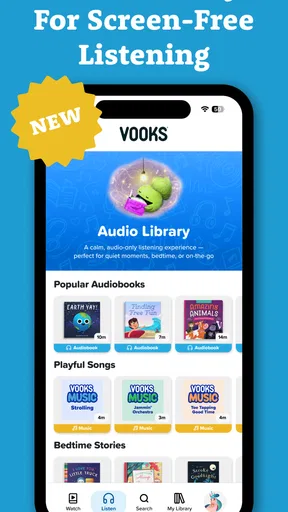
Compared with audiobooks, Vooks adds visual motion and illustrated storytelling. That helps children who need pictures to follow a narrative, but it may be less suitable when the aim is to encourage imagination away from a screen. An audio-only option can work better for car rides, quiet rest, or children who become overstimulated by animation.
Compared with library borrowing, the app is more convenient when a family wants an immediate story without visiting a branch or managing a physical book. A library, however, encourages discovery across many formats and can provide a stronger sense of ownership and shared selection. I see Vooks as a useful companion to those habits, not a reason to abandon them.
Who will get the most from it
I would recommend Vooks to parents of young children who want a controlled, story-focused screen activity. It is a particularly good match for families trying to replace random short videos with something that has a clear narrative shape. It can also help adults who want to introduce more English story exposure during ordinary routines, although the best results will come when a parent occasionally discusses the story rather than leaving the app to do all the teaching.
Teachers and caregivers may also find the format useful for a calm group transition, a listening activity, or a visual prompt for discussion. The app is not a complete curriculum, so I would use it as a starting point: ask children to predict an ending, identify emotions, describe the setting, or draw a favorite scene afterward. Those follow-up activities turn passive viewing into language practice.
I would be more cautious about recommending it to families seeking advanced reading instruction. Animated narration can support vocabulary and comprehension, but it is not the same as a structured phonics program, a workbook, or an app designed around measurable lessons. Children who already read independently may enjoy the stories, yet they may need a separate tool for spelling, decoding, or writing practice.
Costs, supervision, and choosing a routine
The free installation makes it easy to try without committing immediately, while the optional purchases mean families should pay attention to what they choose before building a long-term routine. The listed purchase range extends from $9.99 to $69.99 per item, so the financial decision is more significant than downloading a free utility. I would first test whether the storytelling style suits the child, then decide whether the available access justifies the expense for your household.
Because the app is rated Everyone, it is positioned for a broad family audience. That rating should not be mistaken for a recommendation to leave a child alone with any screen indefinitely. Age, attention span, and sensitivity to animation still vary widely. A child who becomes overstimulated by movement may prefer a paper book or audio story, while another child may need the animation to stay engaged.
A useful routine is to let the adult select a small group of suitable books, allow the child to choose among them, and then finish with one question about the story. This gives the child control without turning the session into endless browsing. It also makes it easier to judge whether the app is genuinely supporting interest in books or simply filling quiet time.
My performance verdict
Vooks succeeds because it keeps its purpose clear: animated, narrated books for children who benefit from a more lively route into stories. Its performance is best understood as a balance. It asks more of a device than a static reader, but that extra demand produces the movement and narration that make the experience accessible. A supported operating system is a helpful starting point, yet families with older hardware should test a full story and prepare the device before relying on it during an important moment.
In my view, the app is strongest as a planned part of family life rather than an unlimited replacement for reading together. Use it before bedtime, during a short wait, or as a bridge between entertainment and books. Keep sessions purposeful, discuss what the child watched, and continue offering printed books and audio-only stories when those formats fit better.
The final recommendation is straightforward: choose Vooks if you want a child-friendly education app that makes books feel active and approachable, especially for early listeners and developing readers. Skip it if you need rigorous literacy instruction, maximum simplicity on very old hardware, or a screen-free reading experience. For families in the middle, it is a thoughtful tool with a clear role, and its best results come from how deliberately an adult builds it into the day.
Pros
- Engaging read-aloud narration helps keep young children focused.
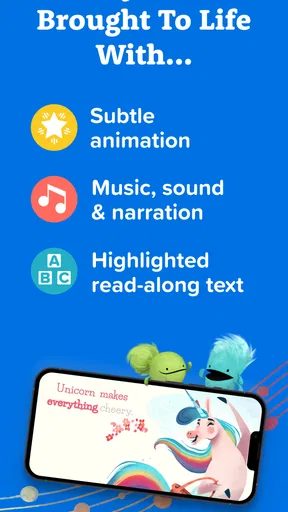
- Includes animated illustrations that make stories more immersive.
- Supports independent reading with highlighted text and narration.
- Offers books from recognizable children’s publishers and authors.
- Useful for quiet time
- bedtime
- or screen-based learning routines.
Cons
- Most of the library requires a paid subscription after the trial.
- The app may encourage passive screen time without adult guidance.
- Some children may outgrow the content quickly as reading skills improve.
- Streaming or downloads can use noticeable storage and mobile data.
- Availability of certain books may vary by region or subscription plan.
FAQs for Vooks: Read-Aloud Kids' Books
What is Vooks: Read-Aloud Kids' Books?
Vooks is a children’s reading app that combines illustrated storybooks with professional narration, gentle animation, music, and sound effects. Instead of presenting a static digital book, it creates a video-style reading experience designed to keep young children engaged while they listen and follow along. The library focuses on age-appropriate stories, early learning, imagination, and independent screen time for preschool and early elementary readers.
Is Vooks suitable for my child’s age and reading level?
Vooks is primarily designed for young children, especially preschoolers and early elementary-age kids, although the best fit depends on your child’s interests and reading development. Many stories are simple enough for children who are not reading independently yet, while older children may enjoy using the narration as support while following the text. Parents should still preview titles to confirm that the themes, vocabulary, and pacing are appropriate.
Does Vooks require an internet connection?
An internet connection is generally needed to browse the catalog and stream stories, but the app may also provide offline access for selected content through downloads, depending on the current subscription and app version. Offline availability is useful for travel, waiting rooms, or areas with unreliable service. Before leaving home, download the desired books and check that they play correctly without Wi-Fi or mobile data.
Is Vooks safe for children, and does it include advertisements?
Vooks is built as a child-focused reading platform and is intended to provide a more controlled experience than many general video or entertainment apps. Its subscription-based model is designed to avoid the interruptions commonly associated with advertising-supported services. However, parents should still review the app’s privacy settings, account controls, and current terms, and supervise younger children when using any connected device.
How much does Vooks cost, and is a subscription required?
Vooks typically offers access through a paid subscription, with pricing and trial options varying by platform, region, and promotional offer. The free trial, when available, can be a practical way to test the narration style, catalog, and usefulness for your family before paying. Carefully review the renewal terms because subscriptions may automatically renew unless canceled through the relevant Google Play or Apple account settings.


